Updates and restarts
Kubernetes (Helm chart). Seamless restarts and automatic image updates.
Seamless restarts
A restart or update starts the new pod, waits for it to be Ready, then stops the old one. Readings, MQTT publishing and the GUI continue through the rollout.
Enable
On by default in the Helm chart:
gracefulRollout:
  enabled: true     # default
valkey:
  enabled: true     # default; or config.Cache.Enabled with your own Valkey/Redis
| Condition | Deployment strategy |
|---|---|
gracefulRollout.enabled and a cache (valkey.enabled or config.Cache.Enabled) |
RollingUpdate, maxSurge: 1, maxUnavailable: 0 |
No cache, or a ReadWriteOncePod history or floor plan volume |
Recreate |
With a ReadWriteOnce history or floor plan volume, both pods are scheduled on the same node (a podAffinity, unless affinity is set).
Rollout sequence
sequenceDiagram
    participant Old as Old pod (leader)
    participant Lease as Leader lease (Valkey)
    participant New as New pod
    participant K8s as Kubernetes
    K8s->>New: start
    New->>New: connect to MQTT, standby
    New-->>K8s: Ready
    K8s->>Old: SIGTERM
    Old->>Lease: release
    New->>Lease: take lease
    New->>New: poll PDUs, publish, record history
    Old->>Old: disconnect MQTT, serve GUI/API for 10 s (/readyz failing)
    Old-->>K8s: exit
- Only the lease holder polls, publishes, accumulates energy and writes history.
- A standby takes the lease only while connected to MQTT.
- The old pod disconnects from MQTT cleanly once the new pod holds the lease, so Home Assistant entities stay available.
- A pod that is killed holds the lease for at most 15 s.
| Variable | Default | |
|---|---|---|
RPDU2MQTT_SHUTDOWN_DRAIN_SECONDS |
10 |
Seconds the old pod keeps serving after SIGTERM |
RPDU2MQTT_LEADER_LEASE_SECONDS |
15 |
Lease length |
The chart sets terminationGracePeriodSeconds: 45 on the pod.
What rolls the Deployment
| Action | Where |
|---|---|
| Restart | Diagnostics page |
| Switch, Force update | Operator page, Deployed version |
| Automatic update | Auto Update |
| Config change | helm upgrade with a changed config: |
| Scheduled restart | autoRestart.enabled (Helm) |
In the GUI
After Restart, Switch, Force update or an automatic update, the Live badge shows Updating and the page shows Waiting for the bridge to come back until the new pod answers. Dismiss appears after 30 s.
After any restart the page reconnects on its own. When the new pod runs a different version, the page reloads; with unsaved edits it asks you to save or discard first.
Without Helm
On every instance:
| Setting | Value |
|---|---|
RPDU2MQTT_LEADER_LEASE |
true |
Cache.Enabled |
true (the lease is kept in the cache) |
RPDU2MQTT_DEPLOYMENT |
Deployment name, so Restart rolls it instead of deleting the pod |
| Deployment strategy | RollingUpdate, maxSurge: 1, maxUnavailable: 0 |
Automatic updates
The app checks the container registry for a newer image and can roll its own Deployment to it.
Enable
Needs the Kubernetes CRD config source. Turn the feature on in the chart values:
kubernetesConfigSource:
  enabled: true
config:
  Operator:
    Enabled: true
The Operator page then appears in the GUI.
Without Helm, also set RPDU2MQTT_IMAGE to the deployed image and RPDU2MQTT_POD_NAME to the pod name (fieldRef: metadata.name).
Settings
Operator page:
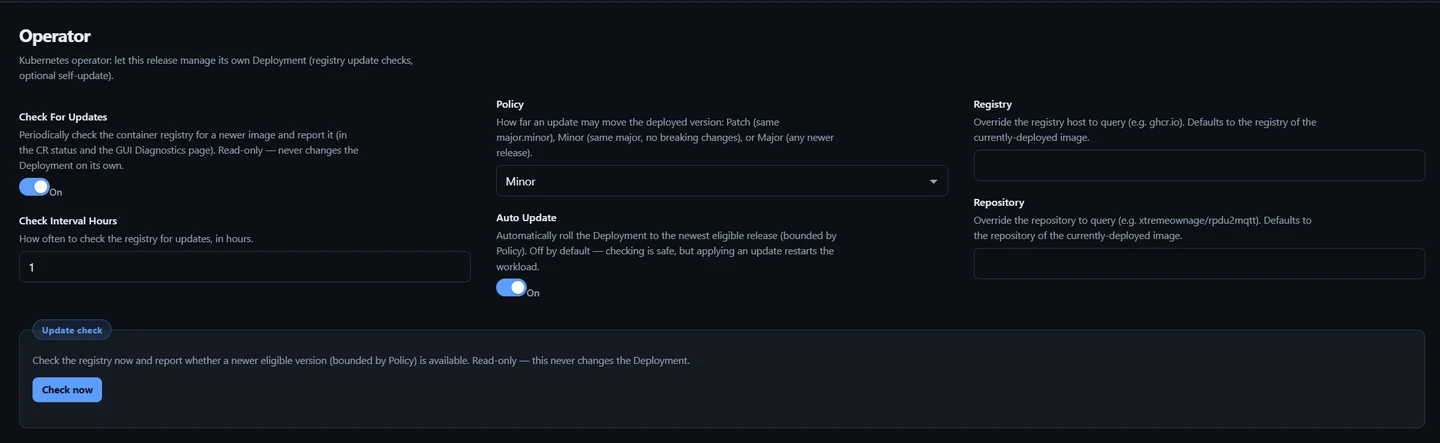
| Setting | Default | Values |
|---|---|---|
| Check For Updates | On | Check the registry on a schedule. Reports only |
| Check Interval Hours | 6 |
Hours between checks. Minimum 1 |
| Policy | Minor |
How far an update may move the version (below) |
| Auto Update | Off | Roll the Deployment to the newest eligible image |
| Registry | registry of the deployed image | e.g. ghcr.io |
| Repository | repository of the deployed image | e.g. xtremeownage/rpdu2mqtt |
Press Save. All keys: Operator settings.
Policy
Applies to version tags (2.0.1, v2.0.1).
| Policy | Deployed 2.1.3 may move to |
|---|---|
Patch |
2.1.x |
Minor |
2.x.y |
Major |
any newer release |
Pre-release tags (2.2.0-beta.1) are never selected.
Channel tags
For a moving tag (unstable, dev, edge, main, latest, stable) the check compares the tag's digest in the registry with the digest the pod is running. Policy does not apply. With Auto Update on, a newer build is pulled under the same tag, pinned by digest.
Update check
Operator › Update check › Check now runs a check immediately. It does not change the Deployment.
Deployed version
Operator › Deployed version:
| Control | Action |
|---|---|
| Switch | Roll the Deployment to the selected channel or release |
| Force update | Re-pull the deployed tag now, pinned by digest |
Header badge

| Badge | Meaning |
|---|---|
↑ 2.1.4 (amber) |
Newer release available. On a channel tag, shows the channel (↑ unstable): a newer build of it is available |
✓ 2.1.3 (green) |
Up to date |
| Check updates | No result yet, or the check could not run. Hover for the reason |
Click the badge to check now. Hidden without the Kubernetes config source.
When Auto Update rolls the Deployment, the GUI shows Update applied — rolling to … and waits for the new pod (In the GUI).
What is updated
Every Deployment in the release that runs the app image: the container image and RPDU2MQTT_IMAGE. The Valkey Deployment is not changed. Each Deployment rolls with its own strategy, so the update is seamless when that is enabled.
Status
The result is written to the RpduConfig status:
kubectl get rpduconfig rpdu2mqtt -n rpdu2mqtt -o jsonpath='{.status.update}'
| Field | |
|---|---|
available |
Newer eligible image exists |
current, latest |
Deployed and newest eligible tag |
policy, autoUpdate |
Settings used |
applied, appliedAt |
Tag and time of the last automatic roll |
checkedAt |
Time of the last check |
message |
Result text |
Schedule
First check 20 s after start. Checks then run every Check Interval Hours.