Nodes
Nodes page
Energy Flow › Nodes. Every node you added. PDUs and outlets are added automatically and are not listed.
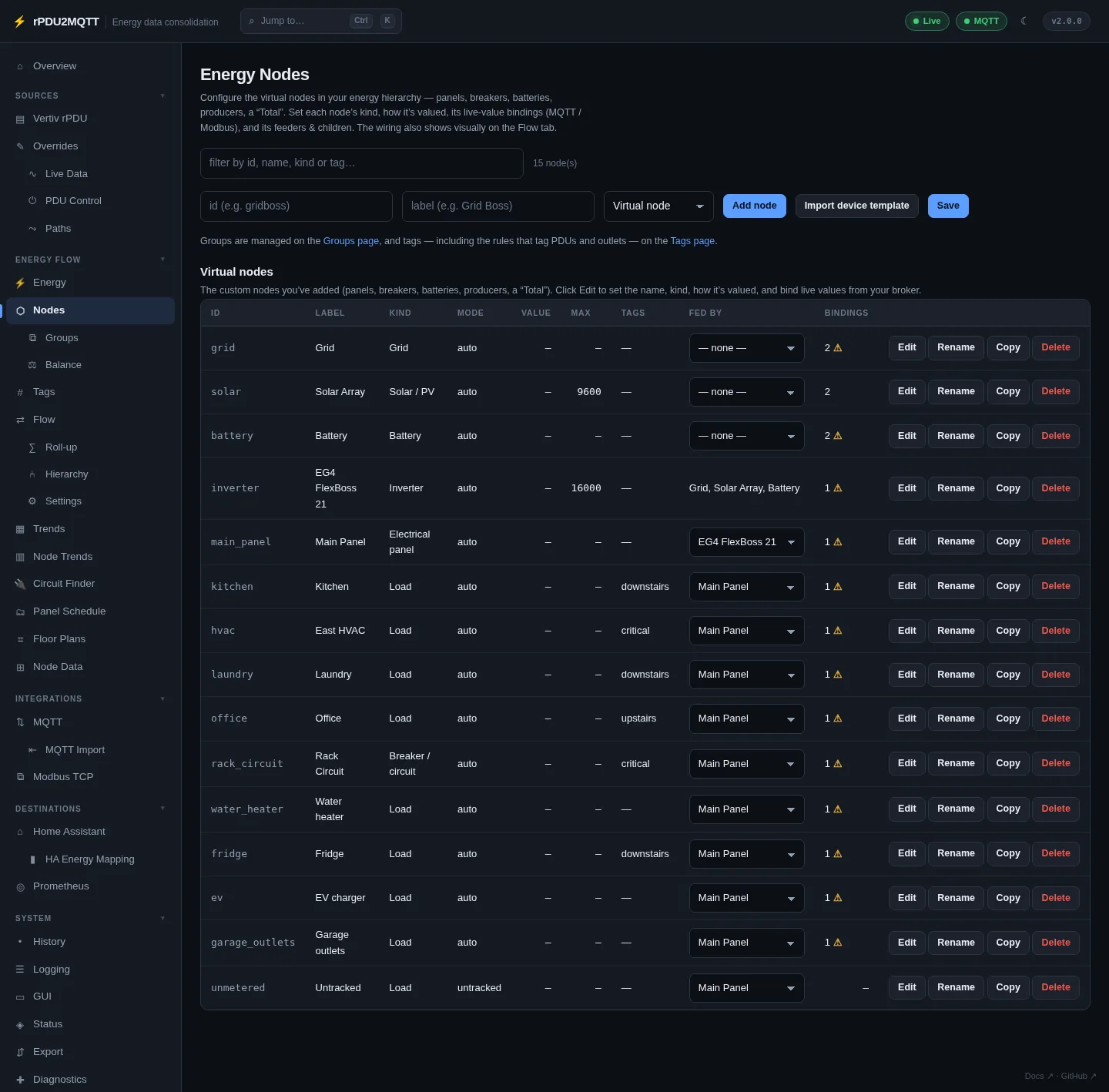
- Add node: id, label, kind.
- Import device template: adds pre-wired nodes and the Modbus connection for a known device (EG4 FlexBoss 21). Check register addresses and scales against your device.
- Fed by sets the feeder from the table.
- Edit opens the node editor. Rename changes the id and keeps its links. Copy duplicates it.
- The bindings column shows a warning when a measured node has no energy (kWh) source.
- Save applies. Bindings apply without a restart.
Node editor
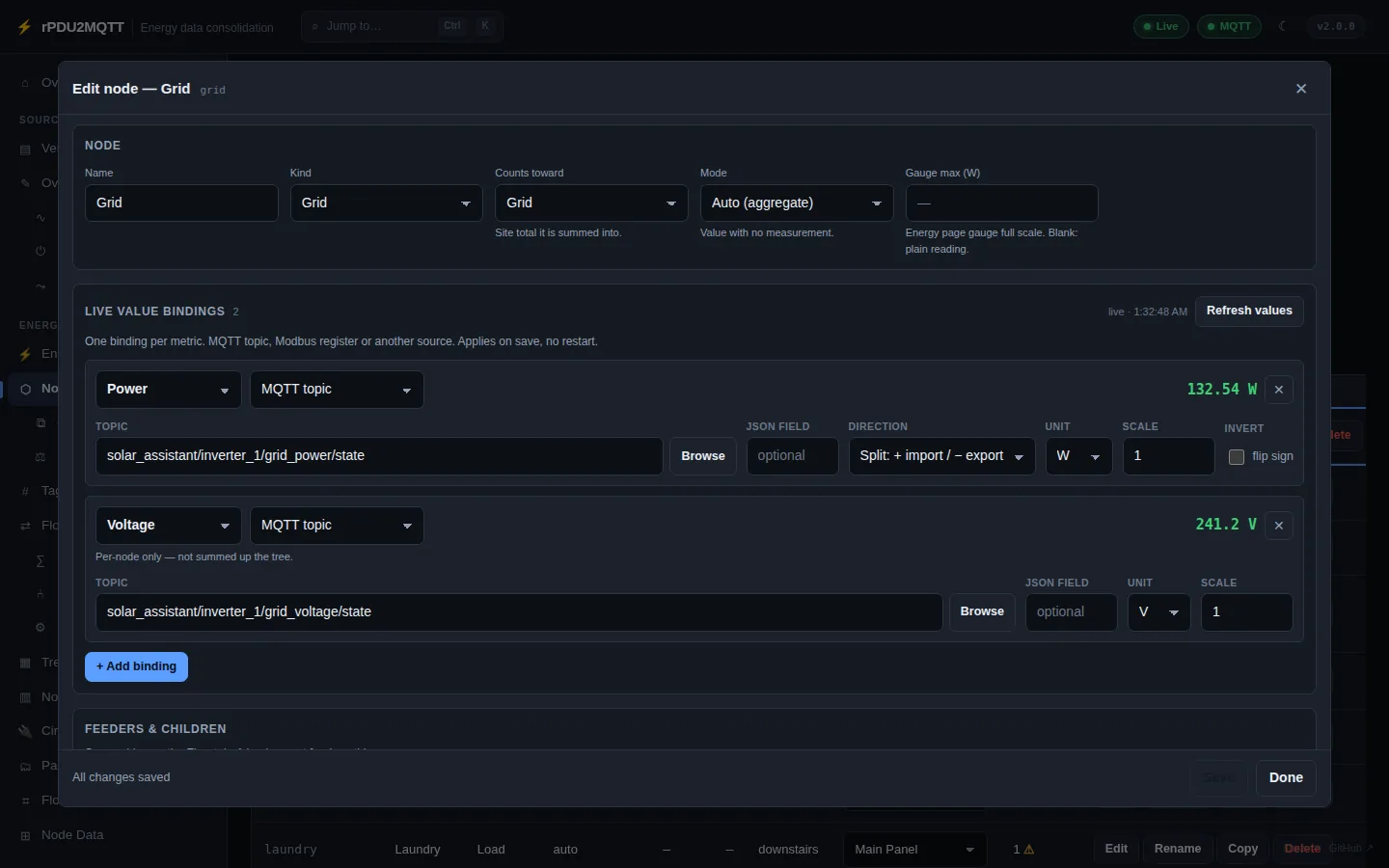
| Field | Setting |
|---|---|
| Name | Label |
| Kind | Kind: node, panel, breaker, inverter, battery, solar, grid, load |
| Counts toward | Balance list: Solar, Grid, Battery, Home or nothing |
| Mode | Mode. See How a node gets its value |
| Gauge max | Max, in the metric's unit |
| Live value bindings | Sources[], one per metric |
| Fed by / Feeds | Links |
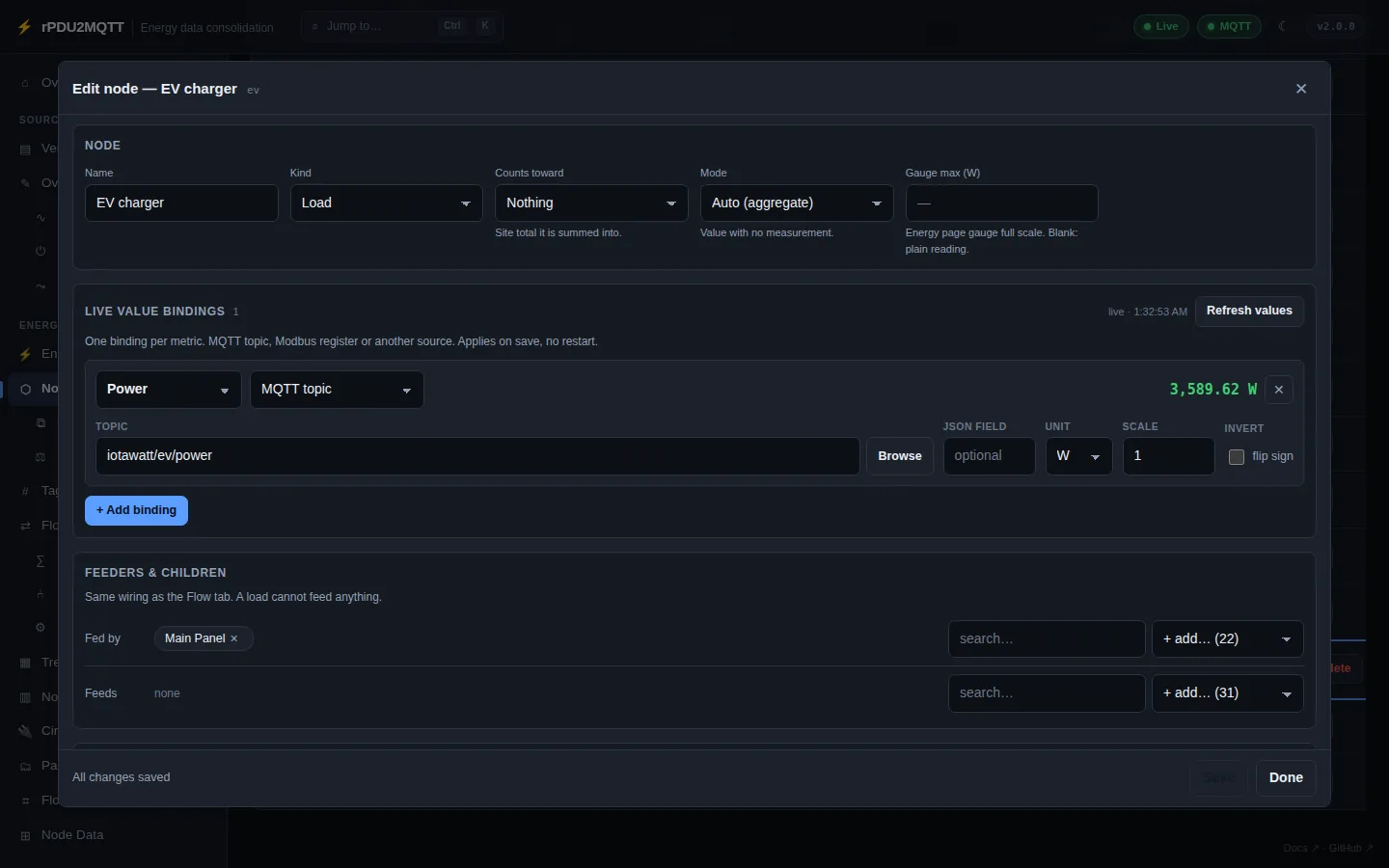
A load cannot feed anything.
Bindings
+ Add binding, pick the metric and the source type. The live value shows at the right of each binding.
| Type | Reads | Key fields |
|---|---|---|
MQTT topic (mqtt) |
A topic on the configured broker | Topic, JsonField |
Modbus register (modbus) |
A register on a Modbus TCP connection | Connection, Register, RegisterType, DataType, WordOrder |
EmonCMS feed (emoncms) |
A feed's current value | Feed (name, tag/name or id) |
Home Assistant entity (homeassistant) |
An entity's state over the REST API | Settings.Entity |
Derived (derived) |
Worked out from the node's other readings | none |
Fields on every binding:
| Field | Setting | Default |
|---|---|---|
| Metric | Metric: realpower, apparentpower, energy, current, voltage, frequency, powerfactor, soc, percent, temperature |
realpower |
| Direction | Direction: out, in, split |
out |
| Unit | Unit, converted to W, kWh, V, A |
canonical |
| Scale | Scale |
1 |
| Invert (flip sign) | Scale: -1 |
off |
| Counter | Accumulation: lifetime or period (resets daily) |
lifetime |
| Stale after | StaleAfterSeconds, 0 = never |
900 |
- Browse lists topics on the broker, feeds on EmonCMS, or entities in Home Assistant, with current values.
- Direction
split: one signed value. Positive is out, negative is in. Grid: out = import, in = export. Battery: out = discharge, in = charge. - Accumulation: check the topic across midnight. A daily counter drops at midnight; a lifetime counter does not.
- A live reading replaces the node's fixed Value. Negative readings count as
0. - EmonCMS bindings need
EmonCMS.Urland a read API key.EmonCMS.Enabledis not required. - Home Assistant bindings use
HomeAssistant.EnergyDashboard.Urland its token. unavailableor non-numeric values supply nothing.
Derived values
| Relation | Exact |
|---|---|
S = V × I |
Always (single phase) |
P = S × PF |
Always |
P = V × I |
Power factor 1 only. Marked assumes a power factor of 1 |
A measured reading replaces a derived one. Missing operands give no value.
YAML
EnergyFlow:
  Nodes:
    - Id: solar
      Label: Solar Array
      Kind: solar
      Max: 9600
      Sources:
        - { Type: mqtt, Metric: realpower, Topic: solar_assistant/inverter_1/pv_power/state }
        - { Type: mqtt, Metric: energy, Topic: solar_assistant/total/pv_energy/state }
    - Id: grid
      Label: Grid
      Kind: grid
      Sources:
        - { Type: mqtt, Metric: realpower, Topic: solar_assistant/inverter_1/grid_power/state, Direction: split }
        - { Type: mqtt, Metric: voltage, Topic: solar_assistant/inverter_1/grid_voltage/state }
        - { Type: derived, Metric: current, Direction: split }
    - Id: server_rack
      Label: Server rack
      Sources:
        - { Type: emoncms, Metric: realpower, Feed: 2_power }
  Links:
    - { From: solar, To: main_panel }
    - { From: grid, To: main_panel }
Kubernetes
An older RpduConfig CRD rejects Type: derived with Unsupported value: "derived". Apply charts/rpdu2mqtt/files/rpduconfig-crd.yaml.
Groups
Energy Flow › Groups. Several nodes drawn as one collapsible node on the flow diagrams. Members keep their own links and exports. The group publishes the sum of members that have data.
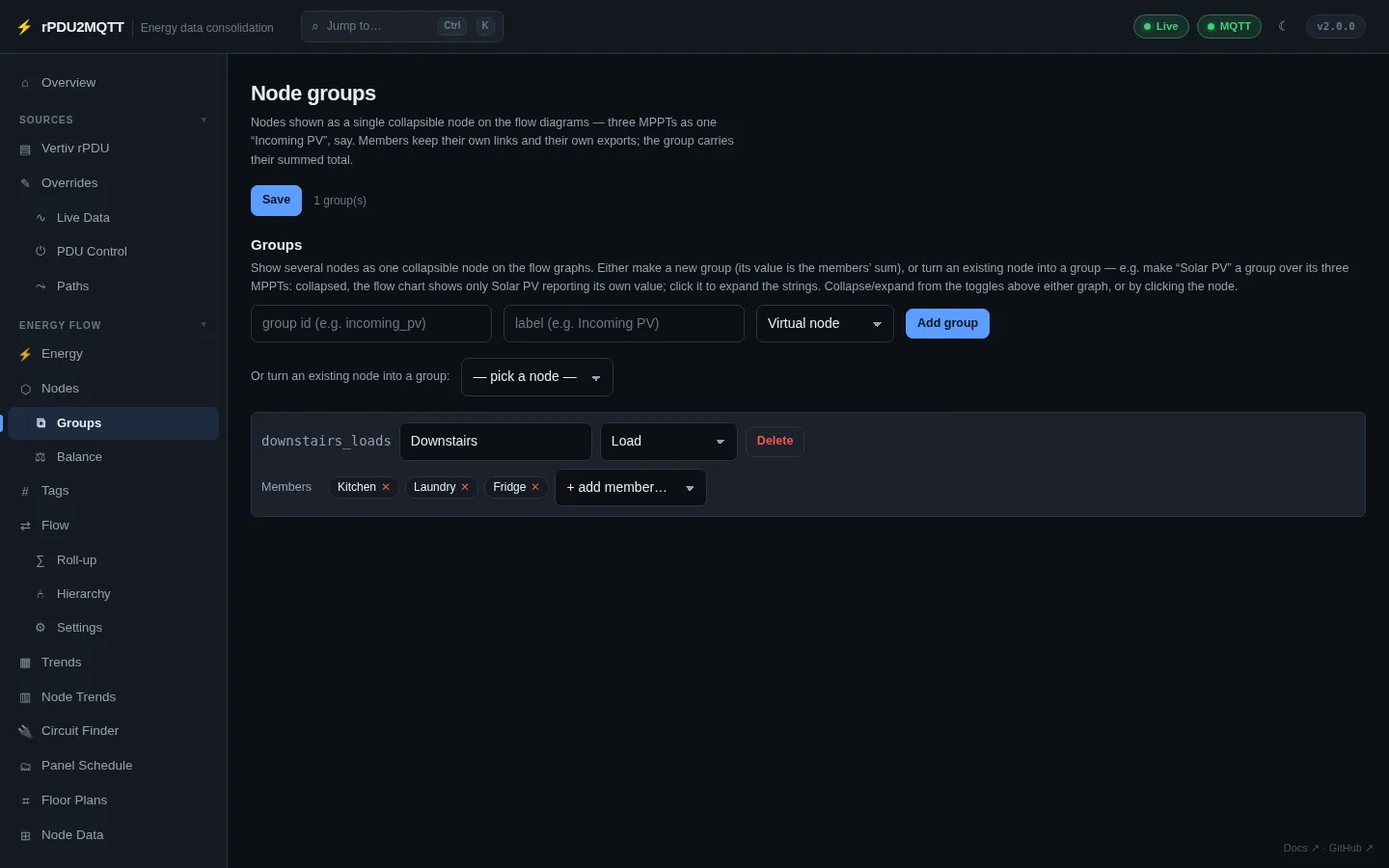
- Add group: id, label, kind, then + add member.
- Or turn an existing node into a group: the node becomes the group's anchor (for example Solar PV over its MPPTs).
- Click a group on the Flow diagram to expand it.
EnergyFlow:
  Groups:
    - { Id: downstairs_loads, Label: Downstairs, Kind: load, Members: [kitchen, laundry, fridge] }
Tags
Energy Flow › Tags. Tags filter the diagram and decide what each destination exports. A tag never changes a value.
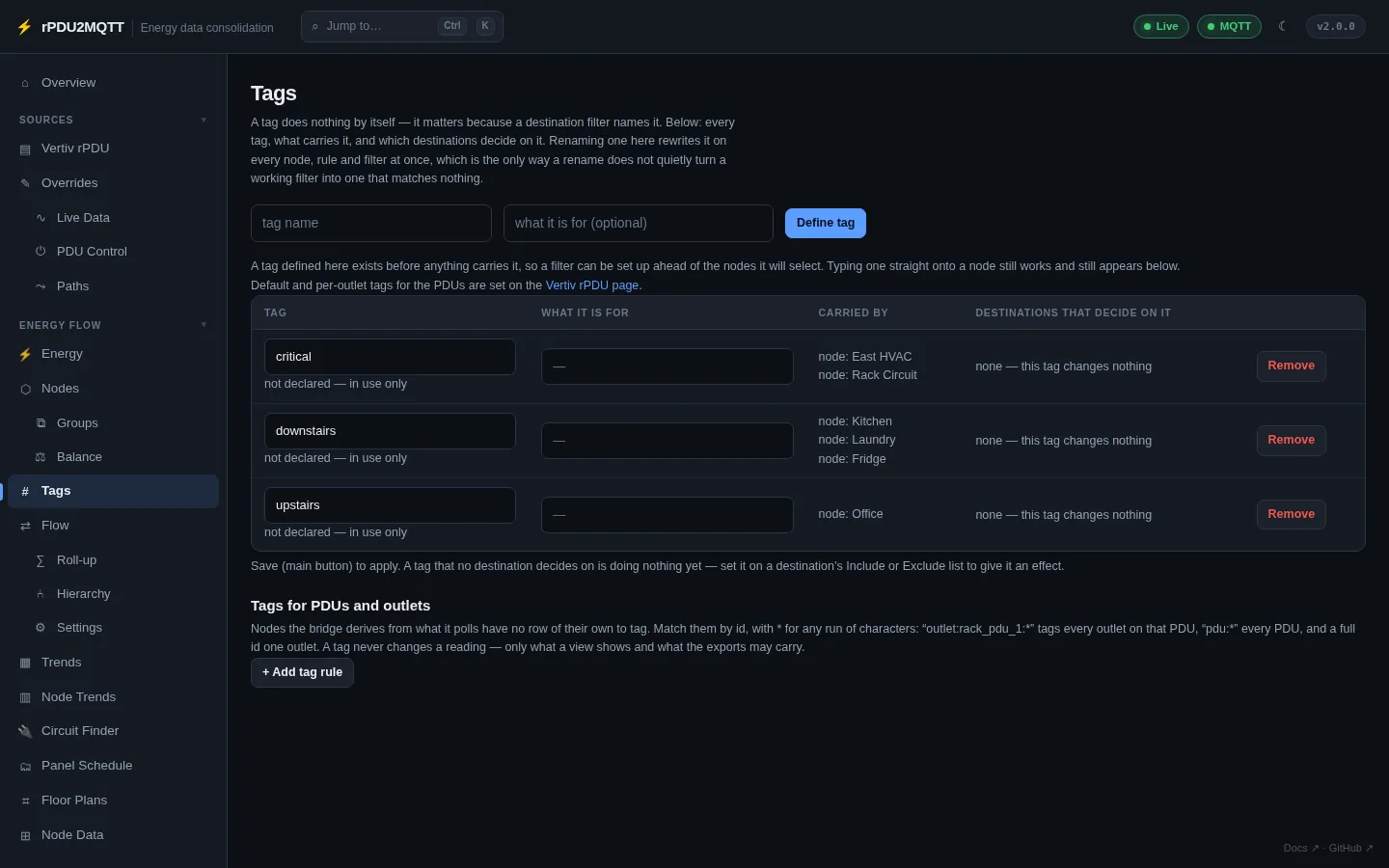
- Define tag: name and description. Declaring is optional.
- The table lists each tag, what carries it, and which destinations filter on it.
- Tags for PDUs and outlets: rules matched by node id with
*, for exampleoutlet:rack_pdu_1:*. Per-PDU and per-outlet tags are on Vertiv rPDU. - Destination filters:
EnergyFlow.MqttExportTags,HomeAssistant.EnergyDashboard.NodeTags,Prometheus.NodeTags,EmonCMS.NodeTags.Excludewins overInclude.
EnergyFlow:
  Tags:
    - { Name: critical, Description: On the UPS }
  AutoTags:
    - { Match: "outlet:rack_pdu_1:*", Tags: [rack] }
  MqttExportTags:
    Include: [critical]