Home Assistant
Two parts:
- MQTT discovery creates the devices and entities. Needs MQTT.
- Energy Dashboard sync fills Home Assistant's Energy Dashboard over its WebSocket API.
Discovery
GUI: Destinations › Home Assistant.
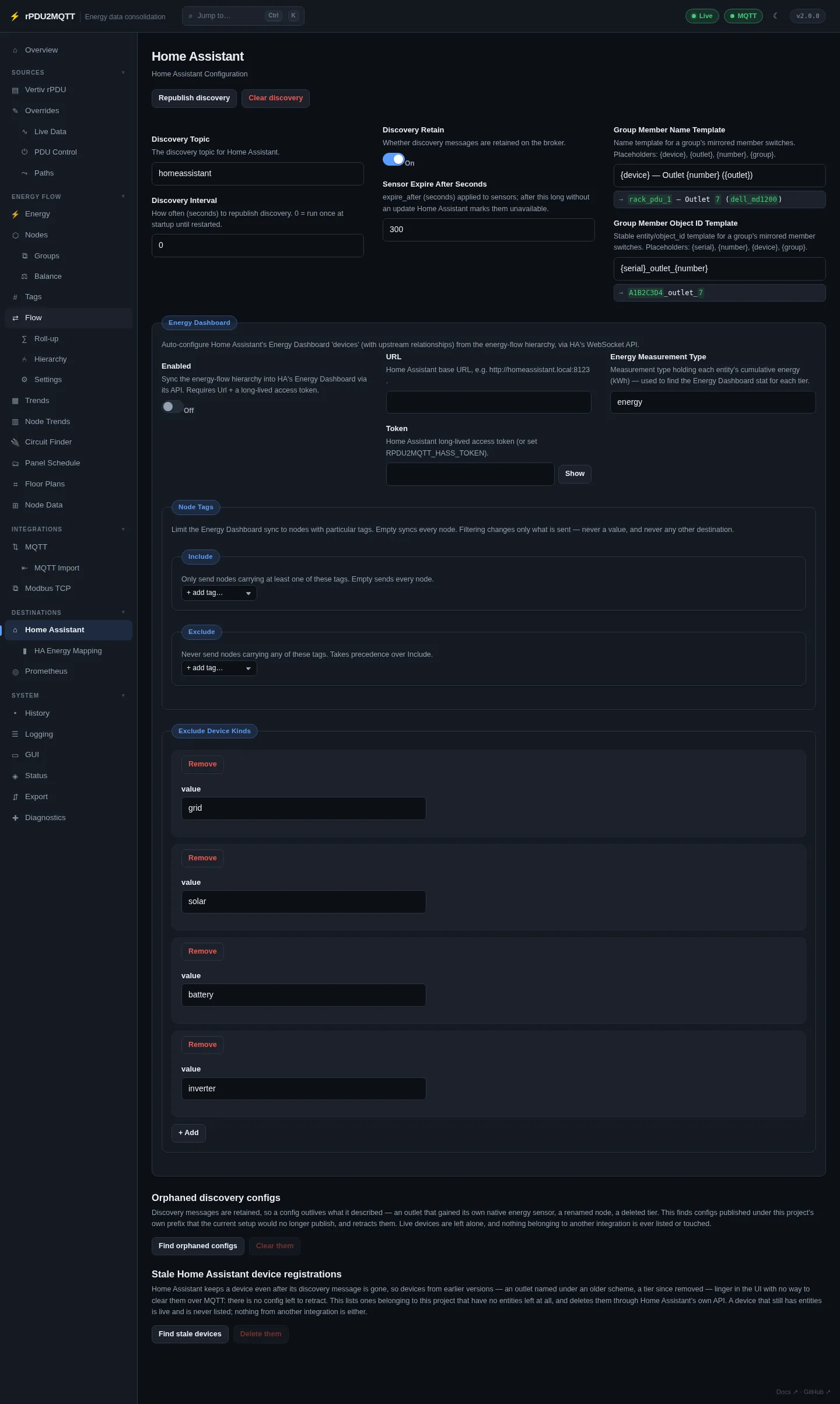
| Field | Setting | Notes |
|---|---|---|
| Discovery Topic | HomeAssistant.DiscoveryTopic |
Must match Home Assistant's MQTT discovery prefix. Usually homeassistant. |
| Discovery Interval | HomeAssistant.DiscoveryInterval |
Seconds between republishing. 0 = once at startup. |
| Discovery Retain | HomeAssistant.DiscoveryRetain |
Retain discovery messages on the broker. |
| Sensor Expire After Seconds | HomeAssistant.SensorExpireAfterSeconds |
expire_after on sensors. |
| Group Member Name Template | HomeAssistant.GroupMemberNameTemplate |
Default {device} — Outlet {number} ({outlet}). Placeholders {device}, {outlet}, {number}, {group}. |
| Group Member Object ID Template | HomeAssistant.GroupMemberObjectIdTemplate |
Default {serial}_outlet_{number}. Placeholders {serial}, {number}, {device}, {group}. |
HomeAssistant.DiscoveryEnabled turns discovery on or off.
Devices created: the bridge, each PDU, every outlet, each OneView group, and every energy-flow tier when Export tiers to MQTT is on (Flow settings). Topics: MQTT topics.
Availability follows the MQTT Last Will (MQTT).
Buttons
| Button | Action |
|---|---|
| Republish discovery | Reloads the saved config, re-reads the PDU and republishes. Applies name, override and template edits without a restart. |
| Clear discovery | Removes the retained discovery messages. Entities disappear until discovery runs again. |
| Find orphaned configs / Clear them | Lists retained discovery configs under this bridge's prefix that the current setup no longer publishes, and retracts them. |
| Find stale devices / Delete them | Lists this bridge's Home Assistant devices with no entities left, or only entities no longer provided, and deletes them through Home Assistant's API. Needs the Energy Dashboard URL and token. |
Energy Dashboard
Fields on the same page, under Energy Dashboard:
| Field | Setting | Notes |
|---|---|---|
| Enabled | HomeAssistant.EnergyDashboard.Enabled |
Default off. |
| URL | HomeAssistant.EnergyDashboard.Url |
e.g. http://homeassistant.local:8123 |
| Token | HomeAssistant.EnergyDashboard.Token |
Long-lived access token. Or RPDU2MQTT_HASS_TOKEN. |
| Energy Measurement Type | HomeAssistant.EnergyDashboard.EnergyMeasurementType |
Default energy. |
| Node Tags › Include / Exclude | HomeAssistant.EnergyDashboard.NodeTags |
Limit the sync to tagged nodes. Empty = all. |
| Exclude Device Kinds | HomeAssistant.EnergyDashboard.ExcludeDeviceKinds |
Kinds left out of the individual devices list. Default grid, solar, battery, inverter. |
Grid, solar and battery sources on the dashboard come from Balance.
HA Energy Mapping page
GUI: Destinations › HA Energy Mapping.
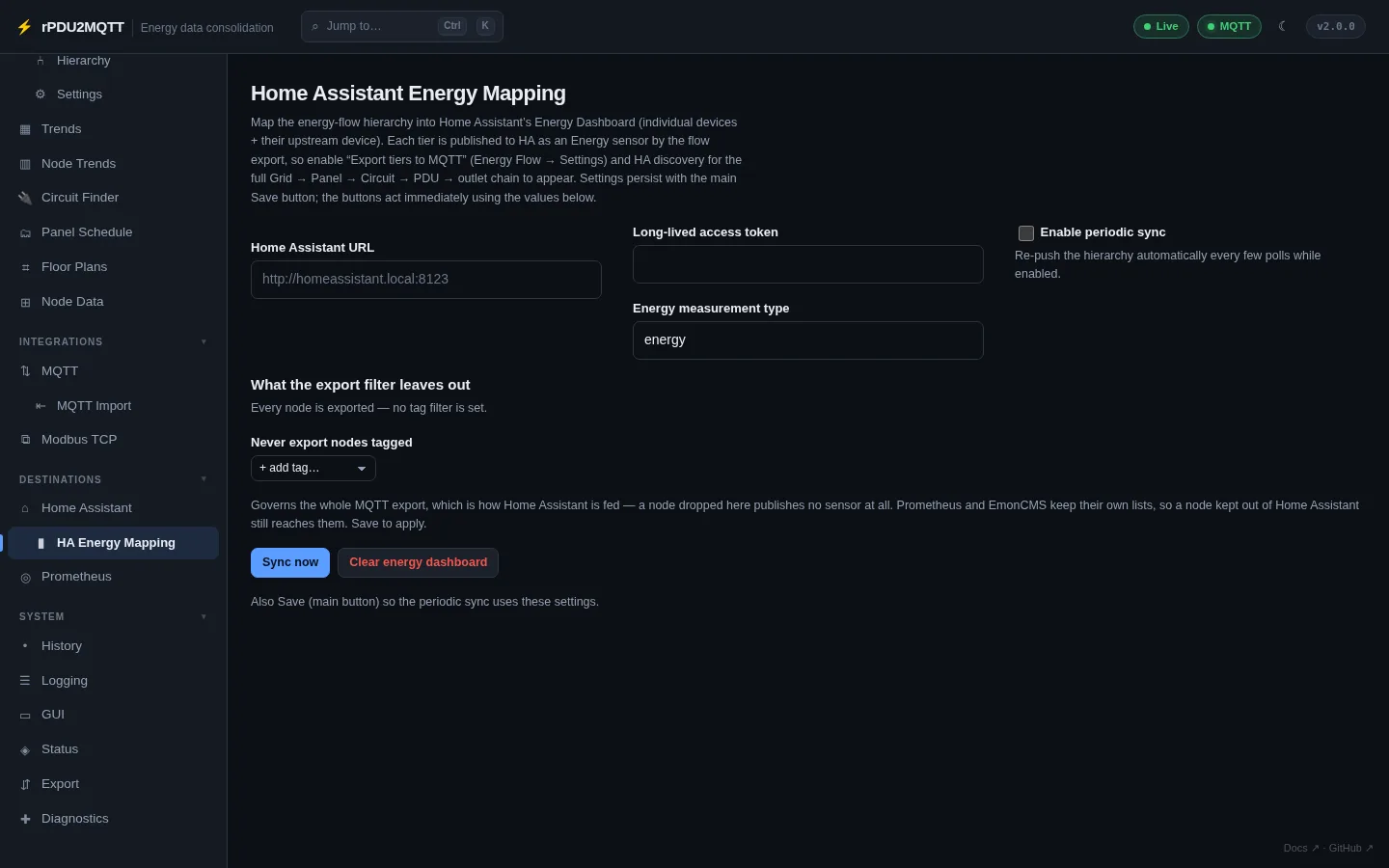
| Control | Action |
|---|---|
| Home Assistant URL, Long-lived access token, Energy measurement type | Same settings as above. |
| Enable periodic sync | Re-pushes the hierarchy every few polls. Save to apply. |
| Never export nodes tagged | EnergyFlow.MqttExportTags.Exclude. A node excluded here publishes no MQTT sensor. Prometheus and EmonCMS have their own tag filters. |
| Sync now | Pushes the hierarchy to the Energy Dashboard. |
| Clear energy dashboard | Removes what the sync created. |
Requires Export tiers to MQTT and discovery on, so each tier exists as a Home Assistant sensor.
YAML
HomeAssistant:
  DiscoveryEnabled: true
  DiscoveryTopic: homeassistant
  DiscoveryInterval: 300
  DiscoveryRetain: true
  SensorExpireAfterSeconds: 300
  EnergyDashboard:
    Enabled: true
    Url: http://homeassistant.local:8123
    # Token: RPDU2MQTT_HASS_TOKEN
    EnergyMeasurementType: energy
The same URL and token are used for Home Assistant entities as node sources, the Home Assistant history backend, and Tools › Publish rooms to Home Assistant on Floor plans.
All settings: Home Assistant settings reference.