Vertiv rPDU
Vertiv / Geist rack PDUs, read over their HTTP API. One or more PDUs per install.
In the GUI
Sources › Vertiv rPDU. Changes apply on Save.
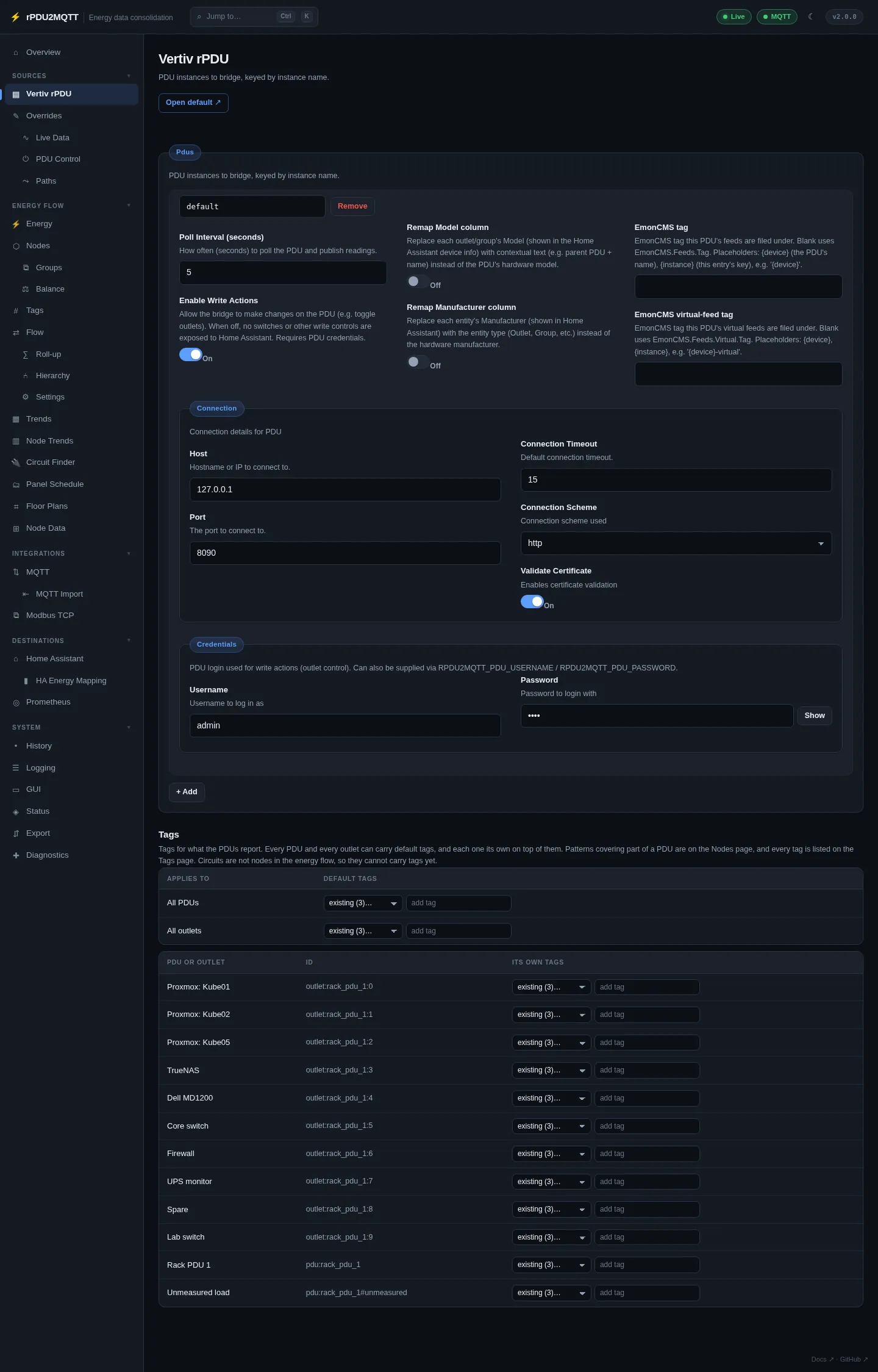
| Field | Setting | Default |
|---|---|---|
| Instance name | Pdus.<name> |
default |
| Poll Interval (seconds) | PollInterval |
5 |
| Enable Write Actions | ActionsEnabled |
off |
| Remap Model column | RemapModel |
off |
| Remap Manufacturer column | RemapMake |
off |
| EmonCMS tag | EmonCmsTag |
blank |
| EmonCMS virtual-feed tag | EmonCmsVirtualTag |
blank |
| Connection › Host | Connection.Host |
|
| Connection › Port | Connection.Port |
|
| Connection › Connection Scheme | Connection.Scheme |
http |
| Connection › Connection Timeout | Connection.Timeout |
15 |
| Connection › Validate Certificate | Connection.ValidateCertificate |
on |
| Credentials › Username / Password | Credentials.Username / Credentials.Password |
- + Add adds another PDU. Remove deletes one.
- Enable Write Actions needs credentials. It adds outlet switches, reboot buttons, delays and power-on action in Home Assistant and on PDU Control.
- The Tags table sets default tags for all PDUs, all outlets, and each PDU or outlet. See Tags.
In YAML
Pdus:
  default:
    Connection:
      Scheme: http
      Host: 10.0.0.10
      Port: 80
      Timeout: 15
      ValidateCertificate: true
    Credentials:
      Username: admin
      Password: secret
    PollInterval: 5
    ActionsEnabled: true
  rack-b:
    Connection: { Host: 10.0.0.11, Port: 80 }
Credentials can come from RPDU2MQTT_PDU_USERNAME / RPDU2MQTT_PDU_PASSWORD (or _FILE). See Environment variables.
A 1.x PDU: section is migrated to Pdus: { default: … } on load.
Outlet operations
With Enable Write Actions on, each outlet gets:
| Home Assistant entity | Type | Action |
|---|---|---|
| Switch | switch |
On / off |
| Reboot | button |
Power-cycle |
| On Delay / Off Delay / Reboot Delay | number |
Seconds |
| Power-On Action | select |
on, off, last |
| Reset Statistics | button |
Reset accumulated energy |
Pages
| Page | |
|---|---|
| Overrides | Names, ids, make/model, enable/disable per device, outlet and measurement |
| OneView | Clusters of PDUs, group roll-ups and group actions |
| Live Data, PDU Control, Paths | Readings, outlet control, generated topics and metric names |
All settings: Pdus reference.